Public, Private, and APIPA IP Addresses
Содержание книги
- Chapter 9 Troubleshooting 161
- Table 1-1 Common Multicore CPUs
- CPU Interfaces and Socket Types
- Dual-Channel and Triple-Channel Memory
- Table 1-4 Major CMOS/BIOS Settings
- Table 1-5 Motherboard Form Factors
- Adapter Cards and Integrated Ports
- Daughter Boards and Riser Boards
- Installing SATA, PATA, and SCSI drives
- Table 1-10 typical PATA settings on systems with two PATA host adapters and two drives
- Table 1-12 Power Fluctuations
- Table 2-2 EIA-568-A Wire Pairs and Pins
- Public, Private, and APIPA IP Addresses
- Static and Dynamic IP Addresses
- Table 2-6 Ports and Protocols
- Installing and Configuring a SOHO Router
- Table 2-9 Common DSL Services Compared
- Line-of-Sight Wireless Internet Service
- Install and Configure Laptop Hardware and
- Other Laptop Display Components
- Docking Station Versus Port Replicator
- Table 4-1 Laser-Printing Process
- Printer Installation and Connections
- Lifting and Moving Equipment Safely
- Communication and Professionalism
- Windows XP, Windows Vista, and Windows
- UAC and the Administrator Account
- Table 6-5 Command-Line Tools for Networking
- Features and Tools Usage How to Run
- Control Panel Options Unique to Windows 7
- Table 6-12 Network Settings by Windows Version
- Table 6-14 Recommended Preventive Maintenance Tasks in Windows
- Virtualization Resource Requirements
- Security Best Practices for Workstation Security
- Data Destruction and Disposal Methods
- Table 7-4 Securing a SOHO Wired Network
- Getting Applications for Your Device
- Mobile Network Connectivity and Email
- Laptop and Tablets: How They’re Different
- Gather Data from the Customer
- Table 9-2 Motherboard, RAM, CPU, and Power Symptoms, Causes, Solutions
- Troubleshooting Video and Display Issues
- Table 9-6 Troubleshooting Tools for Wired and Wireless Networks
- Table 9-9 Operating Systems Symptoms, Problems, and Solutions
- Troubleshooting Security Issues
- Troubleshooting Laptop Issues
- Table 9-13 Tools for Fixing Printer Problems
- CMOS (complementary metal-oxide semiconduc-tor), 11-15, 94
- Digital access, prevention methods, 136-140
- FORMAT command-line tool, 112
An IP address visible to any computer or device on the Internet is a public IP address. If you use a web service to display your computer’s IP address (see Figure 2-5), the public IP address is the one that is displayed.
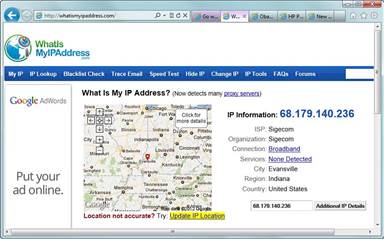
Figure 2-5 Using the WhatIsMyIPAddress.com website to determine the public IP address for acomputer.
However, computers that are connected to the Internet via a business or a home network are actu-ally using a private IP address that is translated into a public IP address.
Each of the classes listed earlier in Table 2-3 includes a range of private IP addresses. A private IP address is not visible on the Internet, although devices with a private IP address can connect to the Internet.
The private IPv4 address ranges for classes A, B, and C are as follows:
Class A —10.0.0.0–10.255.255.255
Class B —172.16.0.0–172.31.255.255
Class C —192.168.0.0–192.168.255.255
To see the IP address assigned to your computer, open a command prompt and use the command-line IPCONFIG.EXE utility. Figure 2-6 shows the network-assigned IPv4 address for the computer whose public IP address was shown earlier in Figure 2-5. As you can see, the computer is using
a private IPv4 address. The router translates this address into the public IP address shown in Figure 2-5.
46 CompTIA A+ Quick Reference
 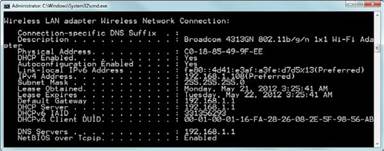
Figure 2-6 Output from IPCONFIG /ALL listing IP addresses, gateways, and DNS servers for awireless network connection.
When a computer or device on a private network needs to connect to the Internet, a router or gate-way makes the connection and uses a feature called Network Address Translation (NAT) to con-vert the private IP address into a public one. The conversion process happens in reverse when the information is relayed back to the requesting device on a private network.
Private IP addresses are usually assigned by a DHCP server. A DHCP server can be a routine run-ning on a server or a feature of a router or gateway device.
In the event that a computer cannot receive an address via DHCP and does not have a fixed IP address, Windows uses a features known as Automatic Private IP Addressing (APIPA) to assign an IPv4 address in the 169.254.x.x address range. This address range does not support Internet access, but enables computers on a local-area network (LAN) to share folders and printers.
In IPv6, the equivalent to an APIPA address is a link-local address. IPv6 can be routed over IPv4 (this enables both versions of IP to coexist), so as long as the computer also has a valid IPv4 address that can connect to the Internet through a gateway, a computer with a link-local IPv6 address will have Internet access (refer to Figure 2-6).
|